Make Money Online Freelance Jobs
Showing posts with label computers. Show all posts

14 November 2016

Best Free Games For Kids to Learn and Improve Brain Power

Bloom Kingdom is a free to play puzzle game by Bearwolf Studios, where you control 2 heroes (1 male and 1 female) on a hexagon grid field. You use these customizable heroes to collect Blooms and cause massive chain reactions. The More Blooms that cascade, the bigger the rewards. To help you on your journey, you have unique pets with special powers, and in-level power-ups as Flowers. Along the way you will run into enemies who will try to destroy the Blooms and hinder your progress. It’s quick and intuitive to learn, but at the same time difficult to master.


Bloom Kingdom has many features:
- 60+ Levels (plus secret levels) & 2 Kingdoms (more in the works)
- 18 Heroes & 13 Pets with different abilities to choose from
- 7 Blooms & 5 Powerups to help you finish the levels
- 3 Enemies to stop you from finishing the levels
- and countless hours of fun!


The game is currently in Halloween mode which will be limited time only. Here is the Teaser trailer:


Here is the Halloween gameplay video from the official YouTube channel of Bloom Kingdom:


..and here is the first 10 minutes gameplay video from me without any commentary:


Do you like puzzles and games? Try to solve Einstein's Riddle or consider playing these cute puzzle games from Japan, Angry Birds Alternatives, Flappy Bird Alternatives, or Guitar Hero Alternatives to keep your mind sharp and active all the time! Studies show that the human brain starts slowing down at around age 30. But you can boost your brainpower by adding simple habits to your daily routine. When you exercise your mental activity, your brain produces new neurons, sharpening your mind and strengthening your memory. Brain exercise games to get mentally fit is also associated with better mental functioning in old age.

Click here to continue reading..
Link:
Loading..
Del.icio.us Digg It! Stumble It Reddit

22 January 2016

Old School Gamers Rejoice: Linkrealms is here!

Linkrealms is an old-school sandbox MMORPG with a hefty feature list that will please fans of classics such as Ultima Online or new players who are looking forward to Albion Online. With classless gameplay and an impressive land ownership where you can build a humble house or the most impressive manor, Linkrealms is a rich game that will appeal to those who favor depth over graphics.

Check out the game's trailer:

Click here to continue reading..
Link:
Loading..
Del.icio.us Digg It! Stumble It Reddit

21 March 2011

JotForm Send Files Straight to your Dropbox

online file uploadJotForm, the first web-based WYSIWYG form builder, allows users to create and publish web forms using your browser... but that's just the start. Take this brand new feature just added to JotForm; you'll be glad you did!

As you may know, Dropbox is an online file synchronization service that comes in the form of a web interface and an application available for many different platforms (PC, Mac, Android and more). It's an easy way to share files between multiple devices and a good alternative to emailing stuff to yourself.

Now you can connect your JotForm forms to your Dropbox accounts. Here's how it works: each time someone fills out a form, the results get sent straight into a JotForm folder in your Dropbox so you don't have to download attachments from your email each time someone sends you a file.

It gets even better. Conveniently, this integration isn't limited to form attachments. The creative minds at JotForm have made it so that the form results (in a PDF file) are sent in as well. How great is that? You can now access your form responses quicker than ever before using your computer with Dropbox installed, or your phone with the Dropbox app.

JotForm has set up a dedicated Create a Dropbox Form page that will allow you to easily set up a sample form with Dropbox integration pre-installed. You can also enable Dropbox on your current forms by going into the Submissions page for your desired form, clicking the Preferences icon at the upper right, and selecting Send Submissions to Dropbox, like so:

DropBox setup in JotForm

For either choice you will be taken through a small wizard. Enter your Dropbox credentials and you're in. Now here's an example of what would happen if you follow the aforementioned procedure. Check out this example of a form I've set up with Dropbox integration. Someone has filled it out and attached some files:

Creating an Online Form

The sender clicks "Submit Form", and done! Dropbox reports that three new files have been added:

DropBox Notification icon

Your DropBox folder on your desktop

Now here's where JotForm's WYSIWYG nature kicks in. JotForm will organize responses for you, saving you time. It will put responses in a JotForm folder in your Dropbox and sort those responses by form name (in case you have multiple forms set up for Dropbox) and ID. You can also configure the integration so that it names response folders based on what the user typed for their Name or their Email instead of the ID, or even throw everything into the form folder without sorting. It's up to you!

How can users put JotForm to best use? We foresee using JotForm as making it easier for site managers to share user photos, for instance. Since such a site would have loads of uploads each day, having all of them downloaded automatically to your computer would definitely be quick and easy. Compare it to the current alternative: drilling through a bunch of emails and manually downloading each and every attachment your loyal users have sent you. Ugh!


This article was written by Rey M. Levenstein, a tech trend-watcher who
has previously written for Sync Blog and now manages WAFFLE.


Click here to continue reading..
Link:
Loading..
Del.icio.us Digg It! Stumble It Reddit

20 July 2009

MemberKit Lets Non-Programmers Create Their Own Facebook-style Site

MemberKit LogoThe astonishing popularity achieved by social media sites like Facebook has spurred developers to try and imitate that kind of success, and although a number of web form builders have been rolled out lately, one of the most promising is Memberkit. It's an online membership content management system for websites that can be used on new or existing sites.

Memberkit stands out from the crowd by being aimed not at other developers but by regular folks like you and me. In effect, someone with only minimal knowledge of programming - or at least, can follow WYSIWYG directions - can set up their very own Facebook-style website. Once up & running, your Memberkit site will allow you to collect subscription payments from your members and create an advertisement based community on a fully custom, professional looking site.

The man behind Memberkit is Aytekin Tank, cofounder of Interlogy Internet Technologies and the creator of JotForm, from which Memberkit has its roots. Memberkit is more general in scope compared to JotForm but still relies on the user-friendly WYSIWIG interface and a straightforward drag and drop builder similar to the builder used in Visual Studio. It's been three years in the making but Tank & company have used the time well, as anyone who takes the software for a test run will learn. It should be mentioned that right now Memberkit is compatible with both the Firefox and IE browsers and plans are in the works to extend support to Safari.

In a nutshell, you can use Memberkit's drag and drop tools to create listing pages, display pages or search forms. Not only can you can create multiple forms, but it's easy enough to program working relationships between them. All of this - and more - is possible without having to write a single line of code!


After reading through the information at the Memberkit website, I thought I'd give it a spin and was pleasantly surprised! The interface seems quite polished and responsive, and I like the narrow focus. It'll be interesting to see how Memberkit evolves over the coming months but I'm very impressed with its practicality, flexibility and above all: ease of use. I heartily recommend visiting the Memberkit website where you can check out a demo of the framework, view a flash-based screenshot tour, even watch a video:


At its present stage of development, Memberkit is targeting a particular market niche but it has ambitious plans for the future. Explains Aytekin Tank, "We have released this first version specifically for membership and social sites. Our plan is to first make it perfect for these specific tasks before turning it into a complete web framework."

Indeed, Tank is not letting the grass grow under his feet. As of March 19 of this year, the full Memberkit documentation file "Memberkit: The Definitive Guide" is now available. The full-featured guide is over 100 pages long and can be downloaded as a single PDF book or can be referenced from the online version which is searchable and commentable. Check it out - the next great social media website just might start here!

Click here to continue reading..
Link:
Loading..
Del.icio.us Digg It! Stumble It Reddit

27 February 2009

Google Chrome: Tough Stuff Beneath a Shiny Wrapper

You've likely heard about Google Chrome, the new browser from the world's leader in search engine technology. What you might NOT have heard is what makes Google Chrome different - and in some ways, better - than the web browser you're using right now. With the announcement this past December 11 that Google Chrome is not in beta anymore, we have done considerable testing and it is now time to write a review.


Even though Chrome does not have that many features, the browser still lives up to its advance hype by rethinking many of the general features a standard web browser has. By doing that, you get a different web-browsing experience compared to what you'd get with Microsoft's Internet Explorer (IE) or Mozilla's Firefox. Currently Chrome is only for Windows but soon we should see some ports for Apple's Mac OS and Linux, though when these ports will be released is unknown.


Let's get down to business. Chrome auto-detects whatever browser you use and prompts you through installation (telling you how to access downloaded files within Firefox, for example). When you first run it, Chrome imports your bookmarks, passwords, and settings from either IE or Firefox. After that, you can start using Chrome. The layout is extremely simple; you will see a row of tabs along the top, an address bar (Google calls this "Omnibar") and a bookmarks bar under the Omnibar. A separate recent-bookmarks bar appears at the right.


Like much of Google's other apps (GMail, for example), Chrome has a very minimalist user interface (UI). There is no menu bar and no title bar, and therefore few distractions. All the settings are to the right of the Omnibar: the page icon manages tabs and utilizes Google Gears to create app-like shortcuts from your desktop to the web, and the wrench accesses basically all the other settings. You can either use a home page or a most visited sites page as the starting point. This page provides thumbnails of the frequently visited sites, shows recent bookmarks and a search box allows for history searching. You can even change the default search engine: you can find the option in the wrench under "options".


Another innovative thing about Chrome is the fact that it bridges the gap between offline and online (so-called Cloud Computing) applications. Chrome can allow you to make a desktop, quick-launch or start menu shortcut to any web page or web app. I, for example, made a desktop shortcut for en.wikipedia.org. When run, Chrome removes all the toolbars and tabs from the window, making Wikipedia look like a desktop app rather than a web page. There are, however, no dedicated back or forward buttons but you can right-click to navigate backward or forward.


Other features Chrome has that some of the other browsers also have include a private-browse mode (Incognito), tools for developers for use in troubleshooting and viewing source code, and the immensely-helpful ability of restoring all tabs from the last session. Chrome has a cool feature known as tab isolation: if a site crashes, it will freeze the tab but not the entire program. IE8 offers a similar feature but Chrome takes it a step further by offering a task manager that shows how much CPU and RAM a page is using. This allows you to crush anything that is causing a problem. You have to configure this tool manually, though.

Also, unlike the beta version, Chrome now includes an actual bookmarks manager (the beta had
only a drop-down menu at the right of the bookbar). The "Bookman" (as I call it) lives in a separate window and utilizes a dual-pane layout: the left pane displays folders and bookmarks and the right pane displays the contents of a selected folder in the left pane. A search box appears in the upper right corner of the Bookman window and displays results as you type. If you have ever used Apple's Safari browser, the Bookman will look very familiar.


By default, Chrome will not auto-restore your session. In other words, if Chrome crashes, you're screwed unless you configure the browser to do otherwise. You can find the settings in the wrench under Options/Basics. Firefox and IE8 both restore the session when they crash. Also, sites that use Javascript and Ajax code work fine, but Microsoft Silverlight isn't supported yet despite the fact that it works with Safari which uses the same WebKit browser code. We also do not have any kind of add-on system.

All-in-all, Chrome is a decent browser for basic browsing all the way up to advanced browsing. The built-in search system that the Omnibar offers is a major plus, along with the general speediness. The task-manager is also something that caught my eye. Last but not least, the fact that Chrome no longer carries the "beta" logo like other Google products is a relief.

Based on the above review, I would like to recommend that everyone give Google's Chrome a try. Google's first attempt at creating a web browser has a lot to recommend it and considering it carries the respected Google brand, one can be sure it's a serious effort that if anything will be improved even further as time goes by.


Article by Rey Matsuda-Levenstein is the owner, operator and webmaster of Yersys Technology Blog, posting news and stories concerning technology, computers, and general information & resources on a near-daily basis.

Click here to continue reading..
Link:
Loading..
Del.icio.us Digg It! Stumble It Reddit

11 November 2008

What If Matrix Ran on Windows XP

Click here to continue reading..
Link:
Loading..
Del.icio.us Digg It! Stumble It Reddit

25 June 2008

Malware: The Difference Between Quarantine and Delete

Just wanted to share a nifty information I found while trying to decide whether I should quarantine or delete malwares from my computer today. Apparently, the idea of having the "quarantine" option when an antivirus detects an infected file is to avoid false positives. If by chance the antivirus software wrongly flags a file as "bad" when the file is actually something you need, like a critical program (for example Explorer.exe in Windows) such that deleting it might cause the computer to stop working, quarantine allows it to simply restore it back.

Anything in quarantine is safely segregated from the rest of your computer, it cannot run from there, so it can do no harm. So the general advice is to put the infected files in quarantine for a while you go about your normal computer activities. If everything continues to run properly after a reasonable period of time (say, about a week or two), then delete the files in quarantine permanently.

Be safe and always quarantine first!

Click here to continue reading..
Link:
Loading..
Del.icio.us Digg It! Stumble It Reddit

15 February 2008

The Thinking Blog Goes Mobile (And So Can You)

Remember a few years ago when camera phones and music phones first started hitting the market? Everyone thought they were the coolest things on the block, but it's actually harder to find a phone that doesn't have a camera today than one that does. Technology is quickly advancing and the public wants more out of their mobile phones. They want to stay connected in every way possible and text messages just won't suffice. They want to harness the power of the world wide web everywhere they go.

Mobile Web For Everyone

Wireless data appears to be the next major frontier for consumer-level cell phones, but not everyone is willing to pay the hefty data fees involved in rendering full web pages. When you visit Beyond the Rhetoric or The Thinking Blog, a series of dynamic elements are conjured up and images are loaded. Watch a YouTube video or two and you could be looking at quite an expensive cell phone bill.

At the same time, blog owners want their loyal readers to have access to their website everywhere they go, and a mobile-optimized version (WAP) is one way to do that. For those of you who aren't familiar, WAP sites carry much the same content as their full HTML counterparts, but they've been stripped of the fluff and heavy downloads. Images are kept to a minimum and the formatting has been designed to better suit the small screen of a cell phone.

I'm not a coder, so I have no idea where to begin when it comes to creating a mobile site. Thankfully, there is a service set up at Wirenode that does this for you, transforming any regular blog into one that is more accessible from a cell phone's WAP browser. Whether you've got a RAZR or an LG Voyager, there's a good chance your modern phone does WAP.

Wirenode Cuts the Wires

Wirenode specializes in creating mobile versions of blogs. As I mentioned earlier, these mobile sites trim the fat, so to speak, leaving readers with the core content. Yes, you lose some of the sidebar navigation and some of the flashy formatting you may have on your full site, but it opens your blog up to a whole new (mobile) audience.

After the mobile version of a blog is set up, Wirenode then allows you to enter into an admin area where you can safely edit the mobile site, adding more pages, images, and adjusting the content to suit your preferences. This appears to be a very straightforward and easy-to-understand process. If you can handle Wordpress, you should be able to handle this.

Better still, Wirenode also provides widgets for your blog. These widgets can inform your existing readers about the mobile version of your blog. These can be found under the Promotion tab in the admin area.

My main gripe is that the mobile sites are hosted at the wirenode.mobi domain, though I'd imagine it is possible to transport them over to your own servers too.

Read The Thinking Blog On Your Phone

To see what mobile blog reading is all about, be sure to check out the mobile version of The Thinking Blog on your cell phone. You can find it at http://ttb.wirenode.mobi/. Now you can access all these thought-provoking posts at the coffee shop, in the library, or when your significant other drags you to yet another boring opera.

Click here to continue reading..
Link:
Loading..
Del.icio.us Digg It! Stumble It Reddit

26 December 2007

Turn Your Desktop Into a Lava Lamp

Bring back 'far out' memories of the 70's with this mesmerising animated wallpaper. Drempels is a nifty piece of software that makes your computer's desktop behave like a screensaver, providing a hypnotic and psychedelic display of constant motion (best viewed on LSD). It allows you to add your own images and also runs in a screensaver mode. It's also open-source now, so you can get under the hood and tinker with the code if you so desire.

This is the first animated desktop program that we've come across that not only works, but it's stable and doesn't affect the system performance at all (when you put every setting on low and limit FPS to 10). Give it a try - it's really cool!

DIRECT DOWNLOAD (529 kb) - From the Drempels website:
"Drempels makes colorful, swirling, hallucinogenic patterns that resemble a hurricane or tornado. It normally runs in your Windows background or 'desktop', replacing your old still-image wallpaper with gently-animating visuals... and meanwhile, you can use your computer just like you normally would. It uses very little CPU overhead - so little that it even runs smoothly on a 233 MHz system!"

Click here to continue reading..
Link:
Loading..
Del.icio.us Digg It! Stumble It Reddit

24 December 2007

POLL: Vote For the Best Ruff PC Review (and Video) - Round 2

Upon much discussion on the previous poll, we decided to break this giveaway down to 3 rounds. We received quite a few comments and emails like how people are supposed to read all the 80 reviews, and concerns about "bribing" for votes among other things led us to take this measure to allow the best reviewer win - not the one with most loyal friends. This is not a popularity contest and we hope the giveaway goes for the one who deserve it most. For a prize of this size, it is much more logical to have a few rounds rather than voting it off in a single poll. So, this is how it will be.

From the total 80 reviews, Top 20 made it to the second round and you have 5 days to vote for the best. On December 30th, Top 5 of round 2 poll will make it to the final round and those finalists will be voted down to one winner in another 5 days. The winner will be announced on Friday, January 4th 2008 on a separate post, and Ruff PC will get in touch with you to send out your Christmas New Year's gift.

There are a few rules as to how you can collect your votes this round. You can't spam people or bribe them with money. Use of any other non-monetary incentives like giving out links, kisses or candy is fine. However, you can vote only once and any violation of these rules or gaming the system will leave the participant out of the giveaway. So, no cheating. It's holiday season people - let's keep the spirit up.

Following is the Top 20 reviews from the first round in reverse order. If you don't have time to read them all, just read a few random ones until you find a review that you think is worthy of your vote. Merry Christmas and good luck!


LIST OF SEMI-FINALISTS (Votes from Previous Round)

01. John Chow Dot Com (5)

02. Homespun Honolulu (5)

03. Zero Hour Sleep (5)

04. Everything and Anything (5)

05. Jim's Rants (6)

06. Great Giveaways (6)

07. Samuel Nova (6)

08. Nakichiam (8)

09. Tim Christie (8)

10. Evangelical's Anonymous (10)

11. In The Brink of the Mental Warzone (10)

12. Kissowa Insider (14)

13. Drops of Blood (15)

14. Bloggrrl (17)

15. Must Read Files (21)

16. Love and Horny (23)

17. Widget's Lab (55)

18. Search for Blogging (73)

19. TechTreak - Review 1 and Review 2 (85)

VOTE FOR THE BEST:


UPDATE 1: Forgot to mention that votes from previous round will be added to the poll to choose the finalists. So, your efforts to gather votes are not wasted. Here are the results from the first round (click on it to see the PollDaddy report):


UPDATE 2: We also started a little side-contest, if you will, for the videos that were created by the reviewers. The rights of the best video will be bought by Ruff PC and used on the website, commercials..etc like Apple did. If you haven't already created a video, you can join now by mashing up something in less than 10 minutes using Animoto, send us your URL via email, and we will add it here. The following are the videos created so far and they are up for votes as well. The same route applies: Top 5 videos that make it to the final round will be voted again, counting the votes from this round as well, to choose the winner.

LIST OF VIDEO ENTRIES

01. TechTreak - Demo 1


02. TechTreak - Demo 2


VOTE FOR THE BEST VIDEO:


UPDATE 3: Wordout emailed me and opted out of the giveaway. Good luck to the rest of you!

Click here to continue reading..
Link:
Loading..
Del.icio.us Digg It! Stumble It Reddit

12 December 2007

10 Crazy Ways to Cool Your Computer

Due to increased heat produced by overclocked components, an effective cooling system is necessary to avoid damaging the hardware. Overclockers go to great extents to keep their valuable hardware cool in the face of ridiculous speeds. Here are a few examples of MHz junkies that might have gone just a little too far while trying to keep their computers cool (in no particular order):


  1. The Turbocharger: This guy had an old turbocharger lying around and decided to put it to good use, pumping air into his flaming hot case faster than any 90mm fan out there.


  2. Liquid Nitrogen Cooled: The Reigning Champion, used again and again with every new chip released. The only way to go for a new 3DMark record. This was used to cool a P4 over clocked to 5.25Ghz!


  3. The Oversize Fan: Built on Plastic Tubing, with a rediculously large fan. Completely custom case with probably the best ventilation possible.


  4. Pool Cooled PC: Cooler Computer, Warmer Pool. This guy integrated the water cooling system for a few computers with his pool's piping to get a cheap and efficient water cooling system.


  5. The Case Fan Case: This case consists of 70 Case Fans total, all blowing air into or out of the case. The fans aren't screwed onto the case, they are the case.


  6. The Cookie Jar Trick: A fan mount, air duct, and hard drive silencing enclosure -- all in one! This practical mod is for anyone running a high speed HDD but looking for some silence at night.


  7. Refrigerant Cooled PC: Think of it as Liquid Nitrogen Lite. This mod uses the same technology as a refrigerator, and is fairly cheap if you have the supplies.


  8. The Water Cooled PC: From 1885? This beautiful rig combines style and substance. Truly a work of art.


  9. The Cooking Oil PC: $1000 worth of hardware submerged in oil. The vegetable oil acts as a good coolant but doesn't conduct electricity. Just don't play Crysis for ten hours straight or you'll end up with some deep fried chips.


  10. Air Ducts: Foam Boards Direct Air Inside Case. This is another cheap and practical mod anyone can do. A few peaces of cardboard and a couple fans to efficiently direct air in any case.


This article was written by SpeedingComputer.com Computer News. Speeding Computer offers interesting tech information and computer news. If you are interested in contributing to the thinking process and become a guest writer on The Thinking Blog, find out more information here and be my guest!

Click here to continue reading..
Link:
Loading..
Del.icio.us Digg It! Stumble It Reddit

11 December 2007

Ruff PC Giveaway: Competition Heating Up!

It's only been three and half weeks since we announced the Ruff PC laptop giveaway and the competition to write the best review keeps on heating up as the 20th December deadline approaches. As you might already know, the final list of reviews will be linked here, then readers get 5 days to check them out and vote on the best. So much so, the review battle is turning into a video mashup battle! See TechTreak's and WordOut's videos after the break and good luck in the competition. The winner will be announced on 25th December here, and Ruff PC will get in touch with you to send out your Christmas gift!

Actually, I think the best video could even be used by Ruff PC, like Apple did with the fan-made iPod Touch video!


Click here to continue reading..
Link:
Loading..
Del.icio.us Digg It! Stumble It Reddit

29 November 2007

The Death of Email?

Do you remember when email was fun? There was a time when it was a great thrill to dial-up to the Internet, log into your email account and sift through the handful of messages from friends and family. Businesses too were impressed with the technology as a way of managing work flow and avoiding superfluous phone calls. Over time the business use of email has come to dominate and the amount of personal email sent has diminished. Which is when email started to fall apart.

In the beginning email was novel, an exciting tool. We didn’t have nearly the same volume of email flooding our inboxes so it was more pleasurable for us to exchange messages with friends and family. As businesses started utilizing email and computers grew as part of everyone’s daily life, it became more associated with work. Along with work email came a flood of spam, and it is hard to emphasize the negative impact this has had on email. Thomas Hawk has a fun read on this topic.

With everyone texting, IMing, Facebooking, and Twittering these days, some say email could be headed the way of snail mail. Which is, people will probably keep on using it, but it won't be the crucial method of communication. Except for spammers, of course. Which brings us to the next phase - what is bound to eventually happen in social networks?

Facebook et al are held as the way forward - but that's for now because they are still novel. Wait till businesses and spammers get a hand on them and find loopholes in the system of our connections which currently have our "friends and family" only. Wasn't junk mail, apart from being slow, one of the reason for the downfall of regular post?

What's more, these "cool" new ways of connecting are woefully inefficient as communication tools. For example, take a look at the number of transactions you need to undertake to read a Facebook message. My personal perspective is that email, or rather Gmail, is still the crucial method of communication and it will never die. Yes, it's not fun as it used to be, but hey - it still works. What do you think?

Click here to continue reading..
Link:
Loading..
Del.icio.us Digg It! Stumble It Reddit

12 November 2007

Find Missing DLL Files Online

Isn't it frustrating when you can't open some programs in Windows just because one file is missing? DLL stands for Dynamic Link Library and DLLs are one those necessary files that are shared by several applications - including Microsoft Windows itself. These files sometimes enjoy deleting themselves for no reason and it can be a pain to restore them. Well, sometimes when you remove a program using Uninstall, it removes all files it installed during the installation progress along with the DLLs used by the program that are also used by other programs.

This problem often shows up in an error window that reports: "A Required DLL File, xxxx, was not found" or "The procedure entry point xxxx couldn't be located in xxxx.DLL" when you try to run an application, but can also manifest itself more quietly as programs not working properly.


The quickest solution to this problem can be by getting the DLL file from one of the following sites and moving it to the directory that it is supposed to be. Unless you have perfect memory, it might be a good idea to note the message in the error window before closing it.
Simply search the missing DLL file, download it and place it where it belongs!

Click here to continue reading..
Link:
Loading..
Del.icio.us Digg It! Stumble It Reddit

07 November 2007

9 Addictive Physics-Based Games Done In Under A Week

Remember the old days when it was all about gameplay? Playing is as old as or even older than art in the history of humanity. Today hundreds if not thousands of new games released every year with most of them just focusing on the graphics - and very little on the gameplay. There is, however, one creative soldier fighting against this trend and his name is Petri Purho. His freeware games are not just fun, addictive and done in under a week - but are also physics-based!

Physics-based games simulate Newtonian laws, using variables such as mass, velocity, friction and wind resistance. It can simulate and predict effects under different conditions that would approximate what happens in real life. This is one of the most important indicators of the quality of a game and given that Petri completed the following games in under a week, which is quite a feat on its own, the gameplay of them are excellent!


Bloody Zombies

Screenshot of Bloody Zombies Screenshot of Bloody Zombies Screenshot of Bloody Zombies

Download

Bloody.zip (0,5 Mb) (Release 1)

Instructions
Bloody Zombies, the goriest game ever made in the glorious 128 x 96 resolution! Fight zombies with your lawn mower! Solve levels with your opponents blood!

Goal is to rescue Barbara from the clutches of the nasty zombies. Collect all the keys in the level to open the door to the next one.

It’s recommended to play the game with a Xbox 360 controller. But it’s also playable with keyboard and mouse.

Xbox 360 gamepad controls

[d-pad] controls the character.
[right thumb] controls the lawn mower.
[right trigger] gives gas to the lawn mower.

Mouse-keyboard controls

[WASD] moves the character.
[Mouse] moves the lawn mower.
[Left mouse button] controls the gas.
Esc will quit the game.


A Tribute to the Rolling Boulder (from Raiders of the Lost Ark)

Screenshot of A Tribute to the Rolling Boulder Screenshot of A Tribute to the Rolling Boulder Screenshot of A Tribute to the Rolling Boulder

Download

Boulder_r2.zip (5,1 Mb) (Release 2)

Instructions


You play as the infamous rolling boulder. Roll over the archeologists and protect the honor of the golden idols of fertility.

If your honor drops to zero (honor is indicated by the bar in the bottom of the screen) the game is over. The honor will decrease if there are archeologists touching the golden idols.

Arrow keys will move the boulder.
Esc - will quit the game.
Alt + F4 - Will quit the game.
Alt + enter - Will toggle fullscreen.


The Amazing Flying Brothers

Screenshot of The Amazing Flying Brothers Screenshot of The Amazing Flying Brothers Screenshot of The Amazing Flying Brothers

Download
Tafb.zip (7,1 Mb) (Release 1)

Instructions

You play as the infamous flying brothers as they try to perform the flying trapeze act.
Only left mouse button is needed.

Click it to release your grip. Try to aim for the other swing.
Hold left mouse button down to accelerate or to slow down. If you press down, when going down you’ll accelerate. If you press down when going up, you’ll slow down.

Esc - will quit the game.
Alt + F4 - Will quit the game.
Alt + enter - Will toggle fullscreen.


Crayon Physics

Screenshot of Crayon Physics Screenshot of Crayon Physics Screenshot of Crayon Physics

Download

Crayon.zip (5,6 Mb) (Release 1)

Instructions

You play with crayons and physics. The goal of the game is to move the red ball so that it collects the stars. You can cause the red ball to move by drawing physical objects.
With left mouse button you can draw and with right you can remove objects.
Space - Will reset the level.

Esc - Will open the menu.
Alt + enter - Will toggle fullscreen.
Alt + F4 - Will quit the game.


Daydreaming in the Oval Office

Screenshot of Daydreaming in the Oval Office Screenshot of Daydreaming in the Oval Office Screenshot of Daydreaming in the Oval Office

Download

Ovaloffice.zip (3,6 Mb) (Release 1)

Instructions

You’re Mr. Bush and you’re daydreaming in the oval office. Trying to collect imaginary pieces of evidence about the Iraq’s weapons of mass destruction.

Use arrow keys to move George around. Try to keep the beach ball off the floor and try to collect the pieces of evidence.

Esc - Will quit the game.
Alt + enter - Will toggle fullscreen.


Moo at the Moon

Screenshot of Moo at the Moon Screenshot of Moo at the Moon Screenshot of Moo at the Moon

Download

Moo.zip (3.6 Mb) (Release 1)

Instructions
As the full moon rises, nature’s most savage beast (cows) reveal their true nature: their ability to fly.

You play as one of the cows, who tries to jump over the moon. The game is played by only using your left mouse button. When you press down on the mouse button the cow clings to the nearest star. Try to jump from star to star and reach the moon.

Esc - Will quit the game.
Alt + enter - Will toggle fullscreen.


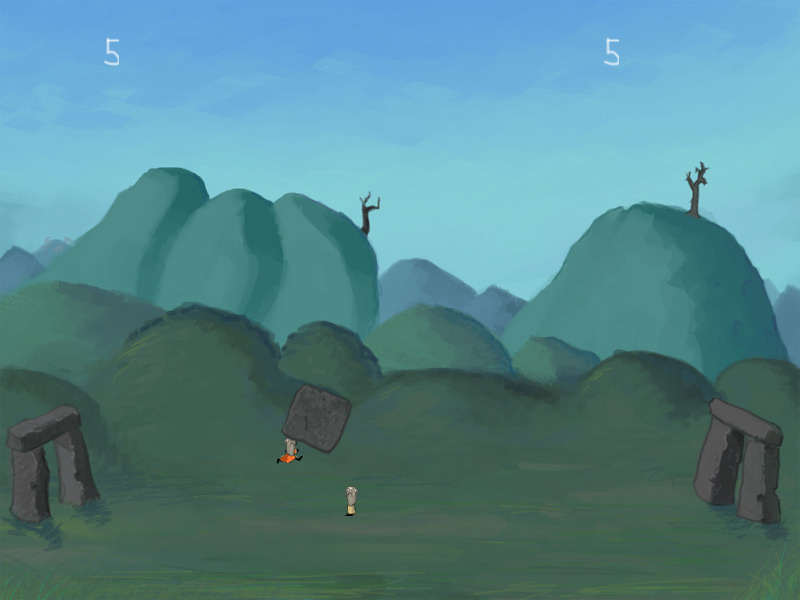
Druid Soccer

Screenshot of Druid Soccer Screenshot of Druid Soccer Screenshot of Druid Soccer

Download

Druid.zip (3.3Mb) (Release 1)

Instructions

You take part in the ancient traditional game of Druid Soccer. Rules: Try to push the big rock to your opponents goal and to defend your own goal. Who ever first gets 10 goals wins the match.

Controls:

Player 1: WASD
Player 2: Arrow keys.
Esc - Will quit the game.
Alt + enter - Will toggle fullscreen.


Cacodemon’s Barbecue Party in Hell

Screenshot of Cacodemon's Barbecue Party in Hell Screenshot of Cacodemon's Barbecue Party in Hell Screenshot of Cacodemon's Barbecue Party in Hell

Download

Cacodemon.zip (5.2 Mb) (Release 1)

Instructions

Mr. and Mrs. Cacodemon are organizing a barbecue party in hell. Unfortunately that means there’s some work to do. You play as Mr. Cacodemon and you have to pluck and grill the kittens.
To pluck the kittens you have to spin them in the air rapidly. After all the hair is gone, throw the kitten in the hell grill (the opening in the left side of the wall) for even better score.

Esc - Will quit the game.
Alt + enter - Will toggle fullscreen.


Pluto Strikes Back

Screenshot of Pluto Strikes Back Screenshot of Pluto Strikes Back Screenshot of Pluto Strikes Back

Download

Pluto_r1.5.zip (4.4 Mb) (Release 1.5)

Instructions

What happens when a planet living on the edge loses its identity? It goes mad and releases its fury on to the unsuspecting solar system.

Your job is to control the huge baseball bat that is circulating Pluto. Try to hit the meteors so that they will cause damage to other planets.

Esc - Will quit the game.
Alt + enter - Will toggle fullscreen.


Petri develops one experimental game every month so check out his blog often and even subscribe to the RSS feed!

Click here to continue reading..
Link:
Loading..
Del.icio.us Digg It! Stumble It Reddit