


JotForm Send Files Straight to your Dropbox
 JotForm, the first web-based WYSIWYG form builder, allows users to create and publish web forms using your browser... but that's just the start. Take this brand new feature just added to JotForm; you'll be glad you did!
As you may know, Dropbox is an online file synchronization service that comes in the form of a web interface and an application available for many different platforms (PC, Mac, Android and more). It's an easy way to share files between multiple devices and a good alternative to emailing stuff to yourself.
Now you can connect your JotForm forms to your Dropbox accounts. Here's how it works: each time someone fills out a form, the results get sent straight into a JotForm folder in your Dropbox so you don't have to download attachments from your email each time someone sends you a file.
It gets even better. Conveniently, this integration isn't limited to form attachments. The creative minds at JotForm have made it so that the form results (in a PDF file) are sent in as well. How great is that? You can now access your form responses quicker than ever before using your computer with Dropbox installed, or your phone with the Dropbox app.
JotForm has set up a dedicated Create a Dropbox Form page that will allow you to easily set up a sample form with Dropbox integration pre-installed. You can also enable Dropbox on your current forms by going into the Submissions page for your desired form, clicking the Preferences icon at the upper right, and selecting Send Submissions to Dropbox, like so:

For either choice you will be taken through a small wizard. Enter your Dropbox credentials and you're in. Now here's an example of what would happen if you follow the aforementioned procedure. Check out this example of a form I've set up with Dropbox integration. Someone has filled it out and attached some files:

The sender clicks "Submit Form", and done! Dropbox reports that three new files have been added:


Now here's where JotForm's WYSIWYG nature kicks in. JotForm will organize responses for you, saving you time. It will put responses in a JotForm folder in your Dropbox and sort those responses by form name (in case you have multiple forms set up for Dropbox) and ID. You can also configure the integration so that it names response folders based on what the user typed for their Name or their Email instead of the ID, or even throw everything into the form folder without sorting. It's up to you!
How can users put JotForm to best use? We foresee using JotForm as making it easier for site managers to share user photos, for instance. Since such a site would have loads of uploads each day, having all of them downloaded automatically to your computer would definitely be quick and easy. Compare it to the current alternative: drilling through a bunch of emails and manually downloading each and every attachment your loyal users have sent you. Ugh!
This article was written by Rey M. Levenstein, a tech trend-watcher who
has previously written for Sync Blog and now manages WAFFLE.


 Everything in life is like a tree. It all starts with a


 With more than 50 million downloads across all platforms, the game has been named one of the most popular games out at the moment. Angry Birds has been exalted for its wonderful union of addictive gameplay, humorous style and cheap price. Its popularity has brought about offers to develop versions of Angry Birds for PCs and consoles, a market for goods combining its heroes and even long-term plans for a movie or TV series.


 (13+) Crush the Castle series - Armor Games
 Whether and to what extent we should simplify our lives and get "back to basics" is a debate that has been going on since the invention of writing. As the rate of technological progress increase at an accelerating pace, a counter trend is emerging where technological development is not inherently synonymous with progress. Proponents of Appropriate Technology (AT) argue that progress can only be achieved with technology that is designed with special consideration to what it is intended for.
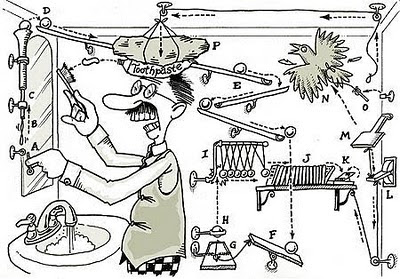 Anything you can do, a machine could theoretically do faster, better, more efficiently but is this really true? The GPS software on my cell phone, for example, can navigate me from one place to another much faster and more efficiently than a human navigator could except that the GPS stops working if I blunder into an area into which the network's signal won't reach. My calendar, which is on the Internet, can be reached from any computer or from my cell phone, and updated from both places. It will send me automated reminders to do things at a certain time but sometimes the reminders themselves will slow me down, or a reminder will come into my phone when I'm trying to talk to someone or when I'm trying to use that GPS locator -- oops, just missed that turn -- thanks, GCal.



 Here is the deal; but keep breathing as you read. I've been working on this question for about 25 years. Never quite got around into putting it efficiently so I tried not to post


 The astonishing popularity achieved by social media sites like Facebook has spurred developers to try and imitate that kind of success, and although a number of web form builders have been rolled out lately, one of the most promising is
